
You land in Lisbon, drop your bags at the hotel, and open Netflix on the room’s TV. The show you were halfway through is missing, and half the catalog looks unfamiliar. It’s a common surprise for anyone trying to watch local content while traveling, meaning the library you pay for at home. This guide explains why streaming changes abroad, which legitimate options to try first, and when a VPN is worth considering. Nothing here works everywhere, and services change their rules without notice, so we link to official help pages and flag what to verify before you fly.
Why Your Usual Streaming Content Changes Abroad
Streaming services license titles country by country. A studio can sell a series to one platform in the US and another in Portugal, so a service can only show what it holds the rights to where you’re standing. Netflix confirms that selection, audio and subtitle options, and downloads vary by country.
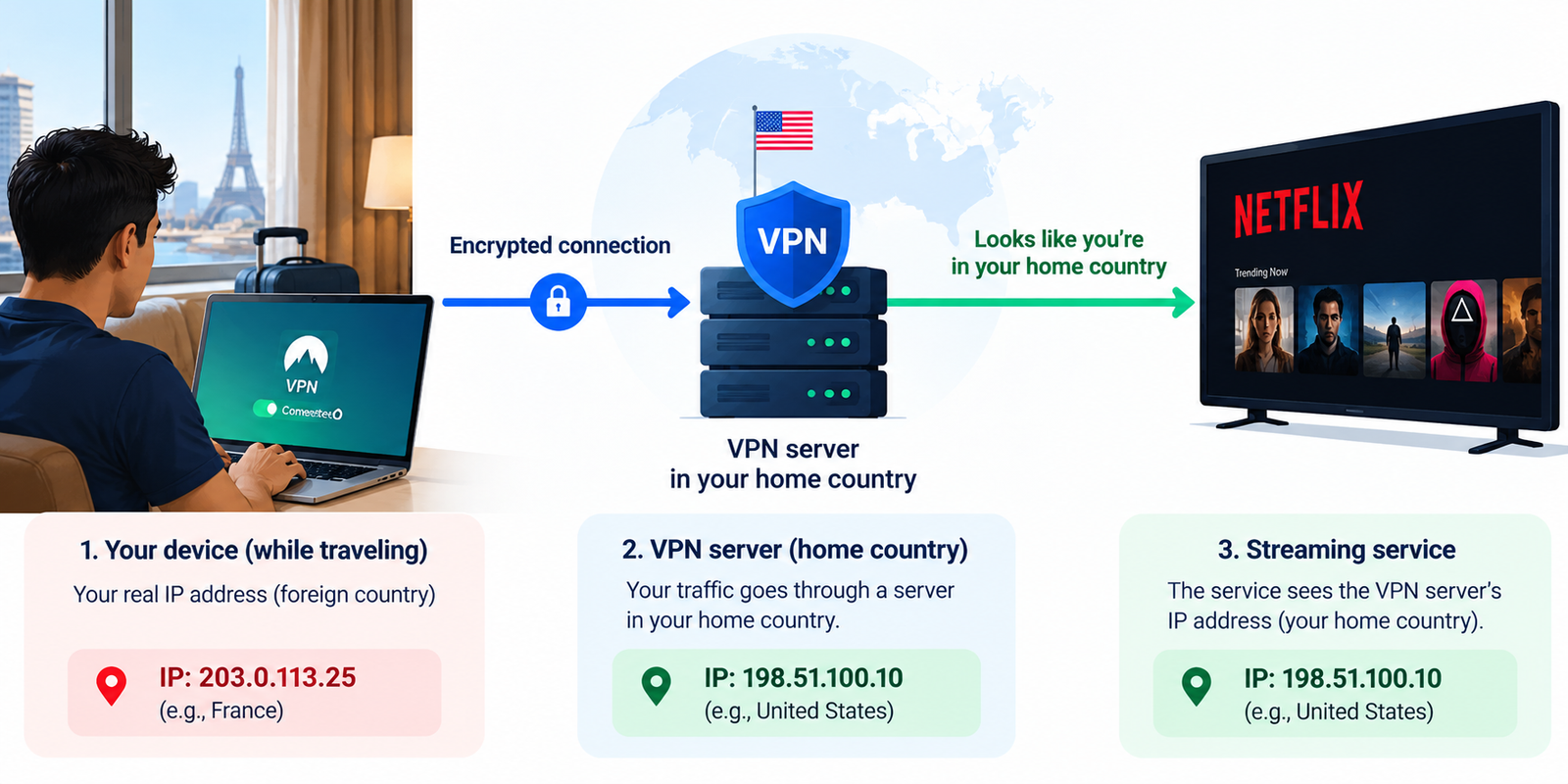
To enforce those deals, services estimate your location from your IP address, the number your connection shows to websites. Switch to a hotel network abroad and the service sees a new address, and often a new catalog.
Three situations look alike but aren’t:
- The service is unavailable. The platform isn’t offered in that country, or your account can’t be used there.
- A title is unavailable. The service works, but a specific show isn’t licensed where you are.
- You’re seeing a different regional catalog. Everything loads, but the library and recommendations belong to the country you’re in, and Netflix notes that age ratings follow your location too.
Sports, live TV, and news are stricter. Broadcast rights are often sold by region, sometimes exclusively to a local broadcaster, so the game you stream at home may be blacked out or replaced by local coverage. Portability rules also vary by service: Netflix lets you use your account on the road, but other platforms set their own policies, so read each help page.
Four Ways to Access Your Home Content While Traveling
Check Your Streaming Service’s Travel Features
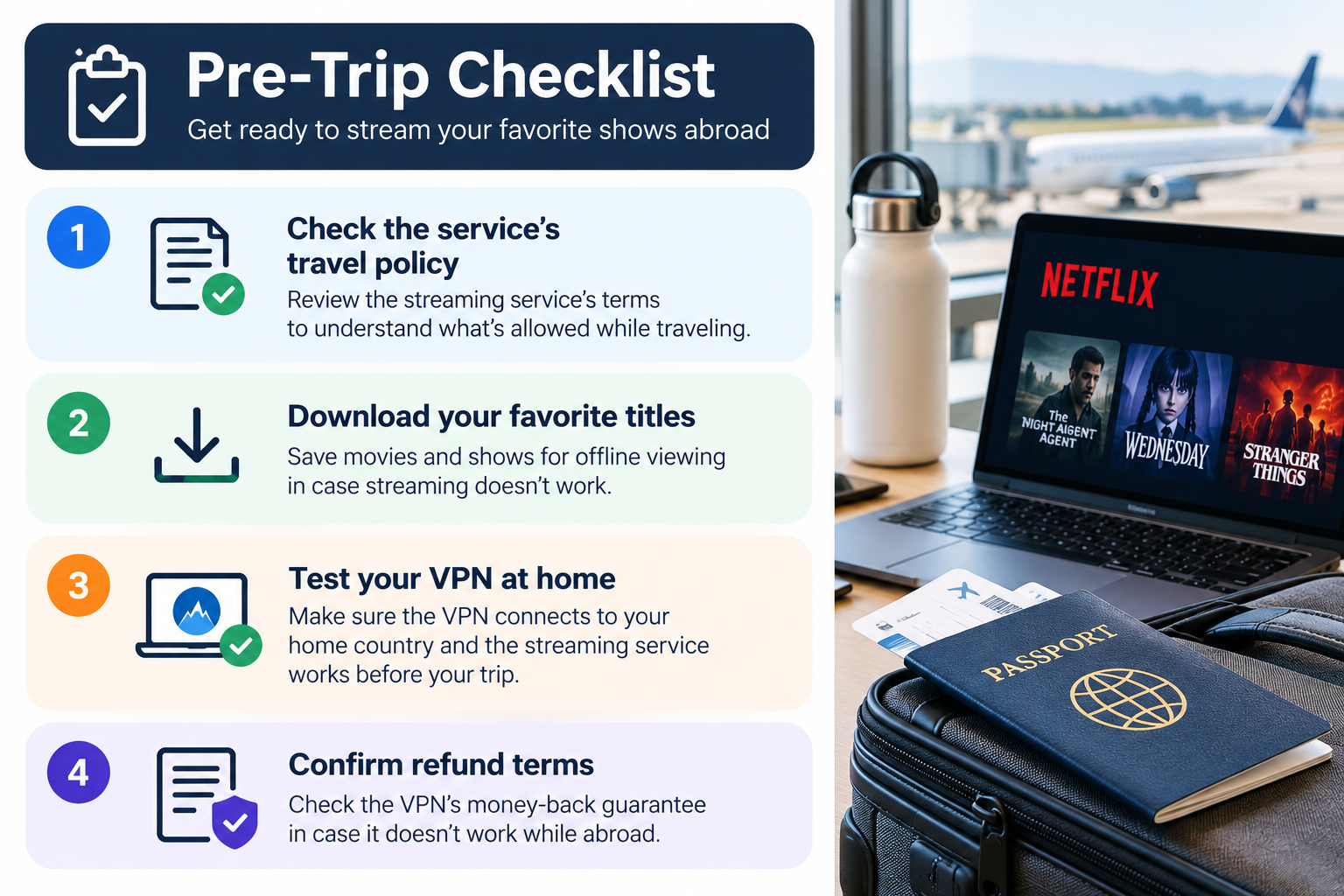
Start with the service you already pay for. Netflix says you can use it on phones and laptops as usual, or sign in on a hotel TV. If a TV asks you to verify, choose I’m Traveling to request a temporary code, and open the app on your home Wi-Fi at least once a month to avoid prompts. The catch: you’ll see the destination country’s catalog, and the temporary-code option can run out. Other services differ, so check each one before you leave.
Download Shows Before Leaving Home
Downloads are the most dependable choice for flights and weak hotel Wi-Fi, though they come with strings. Netflix says downloads expire after a period, and some titles limit how many times they can be downloaded each year. It also warns that downloads already on your device may not be available in another country. Ad-supported plans have a monthly per-device cap. Download at home, then open a few titles in airplane mode to confirm they play.
Use a VPN
A VPN, or virtual private network, sends your traffic through an encrypted connection to a server run by the VPN company. Websites then see that server’s IP address instead of your hotel’s. If the server is in your home country, a service may treat your connection as domestic.
It may not. Services keep lists of IP addresses tied to VPN providers and block them. Netflix says a detected VPN can trigger an error, and that VPNs aren’t supported on ad-supported plans or for live events. A VPN also can’t change licensing, account, or payment rules. Think of it as an option that sometimes works, not a feature you’re guaranteed.
Check Official Broadcasters and Local Streaming Options
For live sports and news, the legitimate route is often the rights holder. Many leagues and broadcasters sell authorized international packages, and local services in your destination may offer short-term plans. Check the league’s or broadcaster’s own site and help pages, including whether your home broadcaster runs an international app. The tradeoffs are extra cost and sometimes a new account, but the stream is licensed.
| Method | Main advantage | Main limitation |
|---|---|---|
| Service travel features | Official and free | You usually see the local catalog |
| Downloads | Works offline | Expiry, per-title limits, may not play abroad |
| VPN | May make you appear to be at home | Can be blocked; no guarantee |
| Official or local broadcasters | Licensed live sports and news | Extra cost, possible new account |
How to Use a VPN While Traveling Abroad
- Check the travel policy. Read the service’s help page before departure. On an ad-supported Netflix plan, VPNs aren’t supported.
- Pick a VPN that fits your devices. Confirm apps for everything you’ll use and servers in your home country. Most hotel TVs can’t run VPN apps, so plan around a laptop, phone, or streaming stick.
- Install and test at home. Create the account, sign in, and try a stream before you leave. Some regions restrict VPN websites, and a refund window is easier to use while you’re still home.
- Connect to a home-country server, where permitted. For a US viewer, that means a US server, ideally near your usual location.
- Open the streaming app and check availability. Try a title you know exists in your home library.
- Troubleshoot calmly. If it fails, work through the fixes below, and accept that some services will block you.
A VPN protects traffic between your device and the VPN server. It doesn’t make you anonymous, and it won’t secure a device that’s already infected with malware.
What to Look for in a VPN for Streaming Abroad
Speed and stability. Encryption and distance both slow connections, and hotel Wi-Fi is often the real bottleneck. Published speed claims vary by test, so use the refund window to check on your own connection.
Home-country servers. Streaming only works if the server sits where your subscription lives. Check the provider’s list for your country, not just a total server count.
Streaming compatibility. No VPN works with every service every day, because services keep blocking IP ranges. Treat any compatibility list as a snapshot.
Kill switch. If the tunnel drops, a kill switch blocks traffic so your device doesn’t quietly fall back to the hotel network. Names and behavior differ by platform.
Audited no-logs claims. A no-logs policy is a promise until an independent firm checks it. Look at who audited, when, what was in scope, and whether the report is public.
Devices and routers. Simultaneous-connection limits run from a fixed number per plan to unlimited, and router apps cover devices that can’t run an app.
Refund terms and support. A 30-day guarantee is common, but read the conditions. Live chat matters when something breaks late at night in another time zone.
VPNs Worth Considering for Travel Streaming
Streaming results change daily, and we haven’t verified these providers against specific services, so this section sticks to documented features and limits. [INSERT MY EXPERIENCE HERE: dated notes from your own testing, such as which home-country server worked with which service, on what device, from which country and network, and on what date.]
ExpressVPN — Best For Mixed Devices and Routers

The highly popular VPN service, ExpressVPN uses TrustedServer technology for best-in-class privacy and high connection speed. It is an excellent choice for secure browsing.


Best for: Travelers juggling phones, laptops, and a router.
What stands out:
- No-logs claims reviewed by PwC and KPMG; check ExpressVPN’s site for the latest report date.
- A Network Lock kill switch on desktop and routers, while mobile apps use different mechanisms.
- MediaStreamer, a smart DNS option ExpressVPN says suits devices that can’t run a VPN app, plus router support.
- A 30-day money-back guarantee.
The drawback: The guarantee doesn’t cover purchases through the Apple App Store or Google Play, and device limits depend on the plan, so buy on the website and check your tier.
Advertised vs. verified: Streaming performance isn’t independently verified here.
NordVPN — Best For Readers Who Want Repeated Third-Party Audits

The excellent speed makes NordVPN a great choice for high-speed browsing and downloading privately and securely.
Best for: People who weigh audit history heavily.
What stands out:
- A sixth Deloitte no-logs audit, completed at the end of 2025.
- A separate Cure53 security audit in 2025 that reportedly found no critical flaws.
- Apps that advertise router installation and custom DNS and protocol settings.
The drawback: The audit report isn’t public. It sits in your Nord account, and the company says it won’t share excerpts. A 2023 audit also left out features such as dedicated IP servers and SmartDNS.
Advertised vs. verified: The audits are independent; streaming performance is not verified here.
Proton VPN — Best For Privacy-First Travelers Who Want to Inspect the Code

High-speed VPN that safeguards your privacy. Stay private and access your banking and social media accounts with peace of mind.
Best for: Readers who prefer open-source apps and published audit reports.
What stands out:
- Proton describes its apps as open source with a third-party audit, and Securitum’s 2022 report was published in full.
- A kill switch with a permanent mode that blocks internet access without the VPN, even after a reboot.
- An advertised network of 20,000+ servers in 140+ countries, so confirm locations in your home country.
The drawback: Streaming support is limited to paid plans, and one reviewer says you must pick individual servers marked for streaming instead of choosing a country.
Advertised vs. verified: The server count is Proton’s own figure.
Affiliate link: [AFFILIATE LINK]
Also worth considering: Surfshark, if you’re covering many devices. It advertises unlimited simultaneous connections and reports Deloitte-reviewed no-logs practices. It merged with Nord Security in 2022, so NordVPN and Surfshark aren’t independent second opinions.
| VPN | Best suited for | Relevant strengths | Main limitation |
|---|---|---|---|
| ExpressVPN | Mixed devices, routers | PwC/KPMG-reviewed no-logs claims; router support; 30-day guarantee | Guarantee excludes app-store purchases |
| NordVPN | Audit-focused readers | Six Deloitte no-logs audits; 2025 Cure53 audit | Audit report not public |
| Proton VPN | Privacy-first, open-source fans | Open-source apps; published audit; permanent kill switch | Streaming only on paid plans |
Common Problems and How to Fix Them
A streaming service detects the VPN. Netflix shows error E106 when it suspects a VPN or proxy. Disconnect, restart the app, and reconnect to a different home-country server. Ask the provider’s support which servers currently work. If every server fails, the service is probably blocking that provider’s range, and travel features or downloads are the better route.
Video buffers or looks soft. Test without the VPN first. If hotel Wi-Fi is the problem, a VPN won’t fix it. Otherwise try a less crowded server, a wired or hotspot connection, or a lower quality setting.
The app won’t load. Update it, check your device’s date and time, restart, and try another network. If a kill switch is on, confirm the VPN is actually connected.
The service reports the wrong location. A VPN server’s IP address can be mapped to the wrong country, and some apps also read device location settings. Try another server. Skip location-spoofing tools, which usually break service terms.
Your device or account doesn’t support the setup. Sometimes the cause is licensing or an account rule, not a technical fault. Use the service’s travel option or contact support. Don’t falsify residency, open accounts with false details, or work around payment checks.
Staying Safe and Respecting Streaming Rules
Hotel, airport, and café networks are shared with strangers, so basic precautions matter. HTTPS encrypts the connection between your browser and a site. A VPN encrypts traffic from your device to the VPN server, which covers apps that don’t use HTTPS and hides your activity from the local network. Neither stops phishing or malware, and a VPN isn’t anonymity: the provider handles your traffic, and your streaming account still identifies you.
Rules differ by service, and Netflix, for one, says VPNs aren’t supported on some plans, so read current terms before you rely on one.
Law matters too. VPNs are legal in the US, UK, Canada, Australia, and much of Europe, but some countries restrict them or allow only approved providers, and the rules that apply are those of the country you’re in. Check your destination’s official travel advice. This isn’t legal advice, and nothing here is a reason to use unlicensed streams or share accounts against a service’s terms.
Frequently Asked Questions
Is it legal to use a VPN while traveling abroad?
In most countries, yes, but not everywhere. A few restrict VPNs, allow only government-approved providers, or ban them, and the rules that apply are those of the country you’re physically in. Check your destination’s official travel advice before you go. This is general information, not legal advice.
Can I watch Netflix while traveling overseas?
Generally, yes. Netflix says you can use it on phones and laptops or sign in on a hotel TV, but you’ll see the catalog for the country you’re in, and downloads may not play abroad. Open the app on your home Wi-Fi before you leave, and choose I’m Traveling if a TV asks you to verify.
Will a VPN always restore my home streaming library?
No. Services block known VPN addresses, and Netflix says VPNs aren’t supported on ad-supported plans or for live events. Even when a VPN connects, licensing and account checks still apply. Treat it as something that may work on a given day, and test it during the provider’s refund window before relying on it.
Can I use a free VPN for streaming?
Usually not. Streaming support is often limited to paid plans, and reviewers report that Proton VPN’s free tier doesn’t support streaming services. Some free plans also cap data or limit server choice, so read the privacy policy and audit details before using one on public Wi-Fi.
Why does my streaming app show different content abroad?
Rights are licensed by country. The service estimates your location, mostly from your IP address, and shows the library, age ratings, and download options for that country. A missing show usually means it isn’t licensed where you are, not that something is wrong with your account.
Should I download shows before traveling?
Yes for flights and unreliable Wi-Fi, but test first. Downloads expire, some titles limit how often they can be downloaded, and Netflix says existing downloads may not be available in another country. Download at home, open a few titles in airplane mode, and keep the app signed in.
Choose the Right Option for Your Trip
Start with the most official routes: your service’s travel features, downloads for the flight, and licensed local or broadcaster options for live events. Consider a VPN only if you need specific home titles, your service permits it, and you’re willing to test it during the refund window. If you decide to compare providers, our VPN comparison is a reasonable next stop. Check the current rules before you pack.
